openinference
OpenInference Mastra

⚠️ DEPRECATION NOTICE: This package relies on Mastra’s legacy OpenTelemetry-based telemetry system, which is being deprecated. Mastra will remove the old telemetry system on November 4th, 2025. Please refer to Mastra Issue #8577 for details about the deprecation and migration to the new AI Tracing system.
🔄 MIGRATION PATH: Migrate to the new
@mastra/arizepackage which provides native Arize integration with Mastra’s new AI Tracing system. See the Arize Exporter documentation for setup instructions.
This package provides a set of utilities to ingest Mastra spans into platforms like Arize and Arize Phoenix.
Installation
npm install --save @arizeai/openinference-mastra
A typical Mastra project will already have OpenTelemetry and related packages installed, so you will likely not need to install any additional packages.
Usage
@arizeai/openinference-mastra provides a set of utilities to help you ingest Mastra spans into the Phoenix platform (and any other OpenInference-compatible platform) and works in conjunction with Mastra’s OpenTelemetry support. To get started, you will need to add OpenTelemetry support to your Mastra project according to the Mastra Observability guide, or, follow along with the rest of this README.
To process your Mastra spans add an OpenInferenceOTLPTraceExporter to your telemetry configuration within your Mastra instance.
Here is an example of how to configure a Mastra instance to export spans to Arize Phoenix:
# Set the Phoenix collector endpoint and API key in your environment
export PHOENIX_COLLECTOR_ENDPOINT="https://localhost:6006/v1/traces"
export PHOENIX_API_KEY="your-api-key"
import { Mastra } from "@mastra/core";
import { OpenInferenceOTLPTraceExporter, isOpenInferenceSpan } from "@arizeai/openinference-mastra";

export const mastra = new Mastra({
  // ... other config
  telemetry: {
    serviceName: "openinference-mastra-agent", // you can rename this to whatever you want to appear in the Phoenix UI
    enabled: true,
    export: {
      type: "custom",
      exporter: new OpenInferenceOTLPTraceExporter({
        url: process.env.PHOENIX_COLLECTOR_ENDPOINT,
        headers: {
          Authorization: `Bearer ${process.env.PHOENIX_API_KEY}`,
        },
        // optional: filter out http, and other node service specific spans
        // they will still be exported to Mastra, but not to the target of
        // this exporter
        spanFilter: isOpenInferenceSpan,
      }),
    },
  },
});
For general details on Mastra’s OpenTelemetry support see the Mastra Observability guide.
Examples
Weather Agent
To setup the canonical Mastra weather agent example, and then ingest the spans into Arize Phoenix (or any other OpenInference-compatible platform), follow the steps below.
- Create a new Mastra project
npm create mastra@latest
# answer the prompts, include agent, tools, and the example when asked
cd chosen-project-name
npm install --save @arizeai/openinference-mastra
# export some variables for mastra to use later on
export PHOENIX_COLLECTOR_ENDPOINT="http://localhost:6006/v1/traces"
export PHOENIX_API_KEY="your-api-key"
export OPENAI_API_KEY="your-openai-api-key"
- Add the OpenInferenceOTLPTraceExporter to your Mastra project
// chosen-project-name/src/index.ts
import { Mastra } from "@mastra/core/mastra";
import { createLogger } from "@mastra/core/logger";
import { LibSQLStore } from "@mastra/libsql";
import { isOpenInferenceSpan, OpenInferenceOTLPTraceExporter } from "@arizeai/openinference-mastra";

import { weatherAgent } from "./agents";

export const mastra = new Mastra({
  agents: { weatherAgent },
  storage: new LibSQLStore({
    url: ":memory:",
  }),
  logger: createLogger({
    name: "Mastra",
    level: "info",
  }),
  telemetry: {
    enabled: true,
    serviceName: "weather-agent",
    export: {
      type: "custom",
      exporter: new OpenInferenceOTLPTraceExporter({
        url: process.env.PHOENIX_COLLECTOR_ENDPOINT,
        headers: {
          Authorization: `Bearer ${process.env.PHOENIX_API_KEY}`,
        },
        spanFilter: isOpenInferenceSpan,
      }),
    },
  },
});
- Run the agent
npm run dev
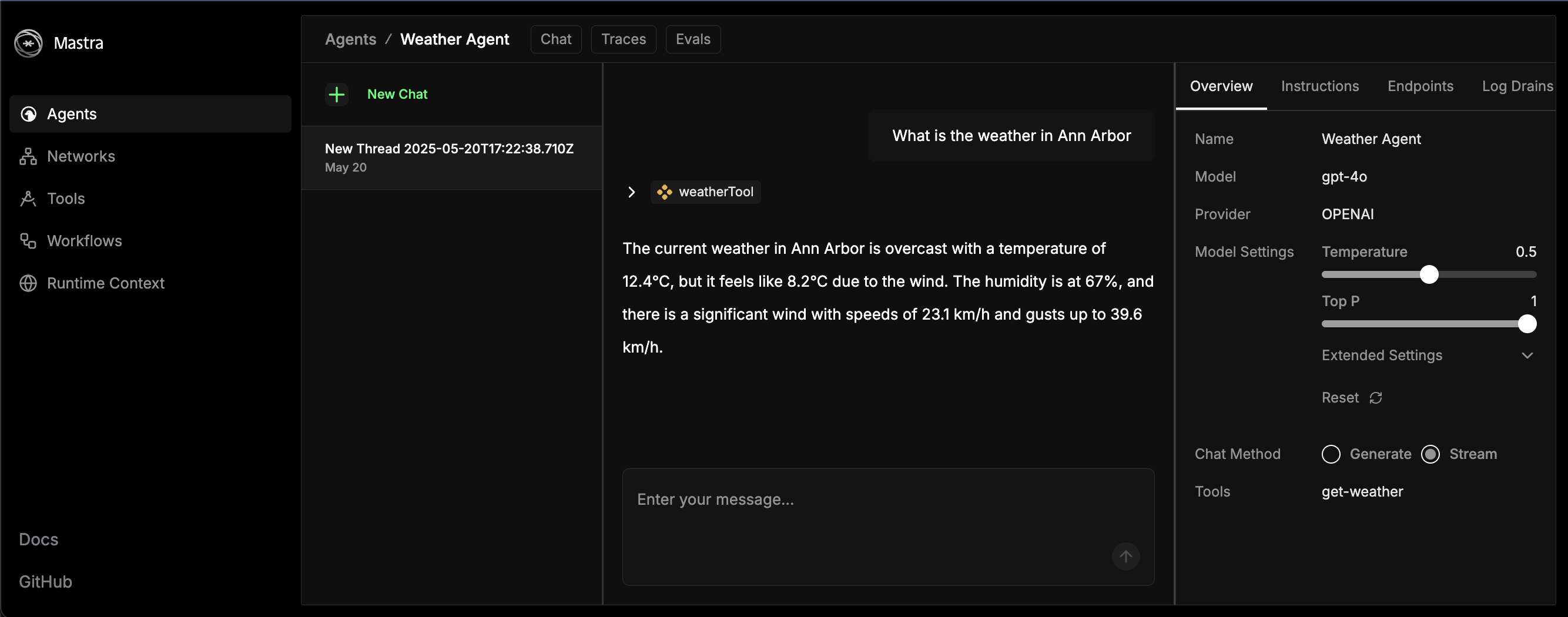
- Send a chat message to the agent in the playground http://localhost:4111/agents/weatherAgent/chat/
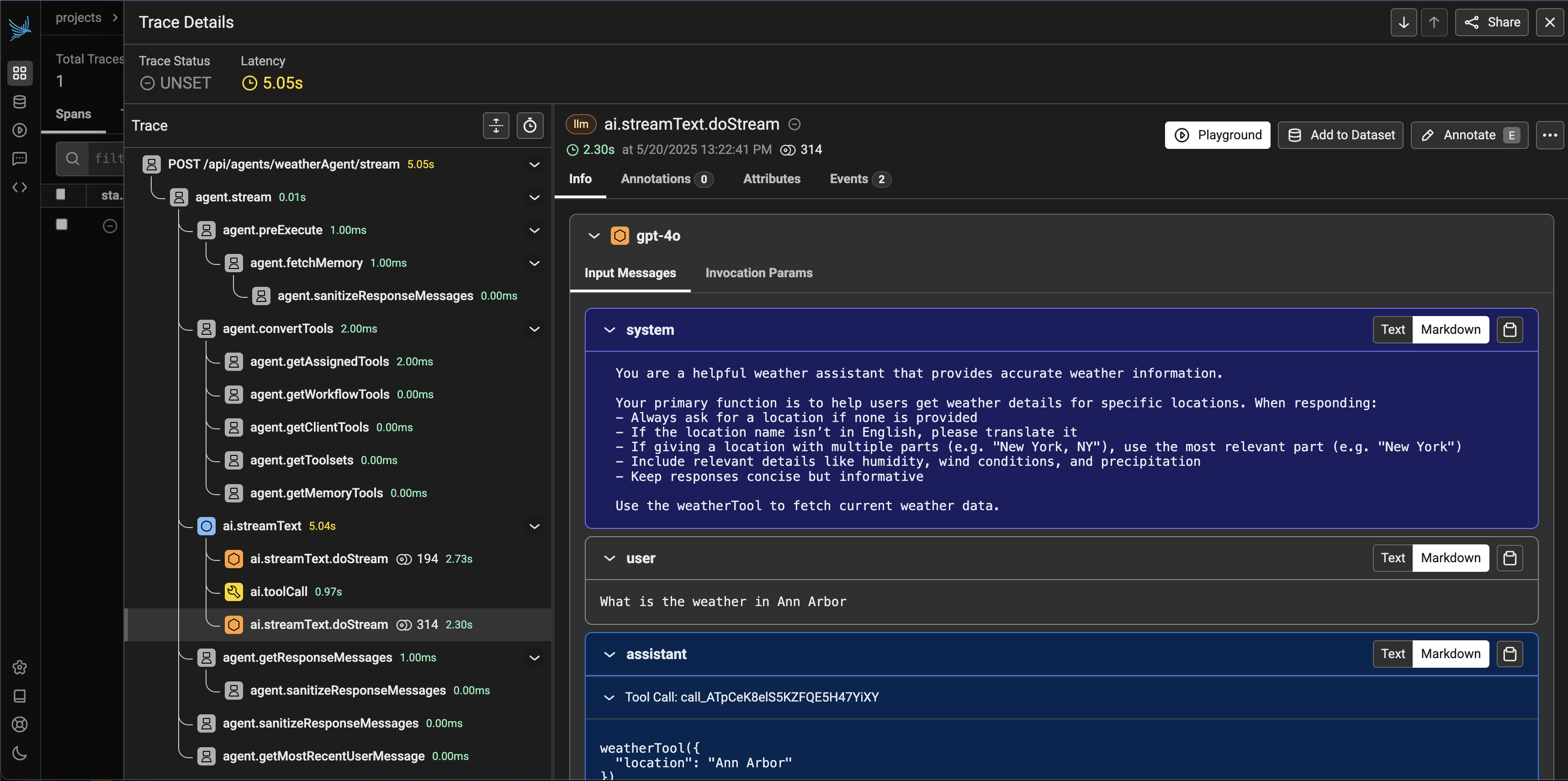
- After a few moments, you should see the spans for the agent’s request and response in Phoenix.
- Not sure how to run the Phoenix collector? Check out the Phoenix docs.
You’ve done it! For next steps, check out the Mastra docs to learn how to add more agents, tools, and storage options to your project.